Tuesday, June 20, 2017

The hour of code


The last week in Informatics we learnt how to use a website called Khan Academy, in this website you can learn all about the subject you want. We chose to star a lesson in Khan academy about how to use codes to draw in the Computer, There are different steps on Khan Academy where you must complete the exercises to win points and go to the next level. It gets harder every time you achieve to complete a level. To learn about your subject you have videos, text explanations and some exercises, and if you complete the you win aproximatly 1000 points.

The logo of Khan Academy:


The first thing we learned in “the hour of code” is how to draw circles. We saw a video in which a girl taught us to use a specific codes to draw a round face. To do that you first have to write ellipse and in () you write some numbers which describe the exact position where the circle will be. She also showed us how to draw a rectangle by using rect(). As we got better we learned other codes for forms like to draw a line or a triangle.

Here is an image of some figures and its codes to draw them:

When we finnished practsing and learning to draw using codes, we had to choose between three different proyects to test our knowledge about the subject: a self potrait, a snowman or a wild animal. I chose the wild animal and I drew a piguin. In the prosses i lernad how to add colors to my drawing. To do that we use the comand fill() and that select a color.

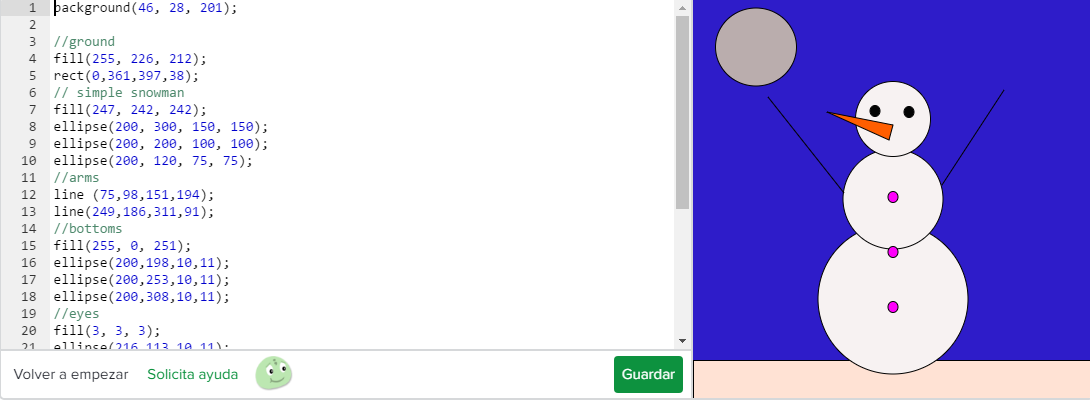
Here is an example of the project of a snowman that my partner andI did:


Every time you complete a challenge you earn points and badges. Some badges I won are: challenger, programing scholar and tinkerer. I also won some “challenge patches”, these are special awards for completing topic challenges. Of this patches I won: the JS: Coloring, JS: Drawing, Hour of Drawing with Code Blocks and the Hour of Drawing with Code.


The Hour of Code

We worked with the program khanacademy.com, that is an online academy that helps you with different subject like maths, Science, Computing, etc. We learned how to make several figures like circles, rectangles, triangles, etc. We were able to "draw" things like a snowman, a penguin and a face with some simple codes. The first code we learned was: ellipse( x, y, w, h );
The x means were the circle is the coordinate of the center (up and down )The Y means the coordinate of the center (right and left) The W means "width" (the width of the ellpise) and the h means "height" ( the height of the ellipse), If you wanna learn more codes like this one, you should try Khan Academy,it is really easy to use and to learn so I hope you use it someday. 


This is the logo of the academy.


The fist step of ¨Drawing with code¨ is a video that teaches you how to make a circule with the command ellipseIn this case the girl , Pamela, used ellipse() because it's the simplest way to draw a human face. She could have used rect() if she wanted to draw something more like a robot face.

The reason there is no circle() is because you can always draw an exact circle by specifying the exact same width and height with ellipse().So ellipse() serves the same purpose as a circle() function would.


When you are almost finished with "the hour of code", you can choose between three different projects to draw on your own, a snowman, a self-portrait or a wild animal. We both choose the snowman project. One of the most important concept is how to add colors to the figure you're drawing, the code for this is: fill(r, g, b); , you can also add color to the background by using: background(r, g, b); , one of the first things they teach you is that the background code must be in the number 1 or in the beginning of everthing. This is basically all the codes we used to draw this snowman, but we'll show you how we did the self-portrait (for example):


The first code you see is //hair is just so you can remember for what are the codes below because at the end there are so any that you can't remember for what is which,(same with //face, //left eye and etc). The follow one is noStroke(); and we use this so the image has no stroke, before I continue telling you this, it's important to remind you that the ; is of major importance. The next code is rect(x, y, w, h); , we use this to draw a rectangle and we control everthing like the height, the width, etc with the different coordinates inside the gap. The rest is what we already explained.


Candela E and Ma.Elisa G


Monday, June 19, 2017

The Hour Of Code


For the last week I have been working on a project called  in a webside very famed called . Although some of my friends have already used this page, but this week was the first time for me, and i can actually say that i enjoyed pretty much.


Khan Academy is a educational organization that provides free videos tutorials and interactive exercises. The mission of Khan Academy is changing the education for the better by providing a free world-class education to anyone anywhere.
The lessons were conceived primarily for distance learning but are also suitable for use in the classroom. The tutorials are informal in style and organized one concept or lesson at a time.
Also Khan Academy webside users can maintain records of their progress. Teachers can also monitor the progress of students who are using the site. In pilot experiments, schools are using a concept called "flipping the classroom", which involves students watching the Khan Academy lectures at home and the using classroom time for exercise and testing. In this model, the teacher´s role is changed from lecturer to tutor and progress monitor.


One of the projects was a self portrait. Here I leave my personal project:


background(157, 0, 255);

fill(238, 242, 24);
rect(96, 19, 210, 419, 89);  // hair

fill(242, 196,116);
rect(156, 304, 88, 84);  // neck

fill(238, 0, 255);
rect(40, 374, 312, 279);  // body

fill(242, 196, 116);
ellipse(201, 176, 197, 285);  // face

fill(242, 196, 116);
ellipse(201, 186, 25, 51);  // nose

fill(255, 0, 0);
ellipse (202, 247, 95, 20);  // mouth

fill(242, 230, 230);
ellipse(170, 135, 50, 33);  //eye
ellipse(230, 135, 50, 33);

fill(51, 163, 232);
ellipse(230, 137, 23, 28);  // iris
ellipse(171, 137, 23, 28);

fill(8, 8, 8);
ellipse(230, 137, 9, 8);  // pupil
ellipse(171, 137, 9, 8);


Here is the other project that I personally realised. This is a "wild animal":


background(0, 170, 255);

fill(57, 181, 29);
rect(-4, 328, 413, 79); //floor

fill(252, 192, 41);
rect(177, 279, 5, 59);  //legs
line(160, 357, 178, 338);
line(178, 360, 180, 338);
line(196, 357, 182, 338);
rect(228, 280, 5, 59);
line(217, 360, 230, 339);
line(235, 361, 231, 340);
line(250, 357, 233, 340);

fill(255, 255, 255);
ellipse(191, 201, 70, 26); // wing

fill(252, 252, 252);
ellipse(203, 242, 174, 95); // body

fill(255, 255, 255);
ellipse(255, 189, 72, 55); // face

ellipse(213, 241, 108, 48); // wing

fill(255, 81, 0);
triangle(279,203,318,193,280,183); //peak

fill(250, 247, 247);
ellipse(267, 180, 17, 10); // eye

fill(3, 3, 3);
ellipse (271, 180, 5, 5); //iris


Here I leave you a video of the basis data of The Hour Of Code:


MarĂ­a Alejandra Rodillo. 

The hour of code - Drawing with code Chiara and Zoe


In the last classes of informatics we have been working on a webpage called Khan Academy. Khan academy is a webpage where you can learn technologic content (like making graphics or drawing)on line.Our teacher made us use this webpage to learn drawing with code.The page had different challenges which helps you to increase your level by drawing with code.The more challenges you complete the more content you learn and the more difficult they become. The page shows you video tutorials that teaches you how to draw with code and then gives you a challenge. Thats when you have to prove that you have been paying attention. At the end you become a challenge about a final project that you have to do all by yourself. Completing this challenges makes you win points.


This image shows the logo                                 of Khan Academy


This screenshot shows the video tutorial of the first challenge, where we learned what the different words like ellipse mean and what to write to draw a form like a circle. In this case you have to write ellipse to draw a circle and the place of the circle depends of wich numbers you choose. This the first form you learn to draw.

This is a step by step of the Khan Accademy "The hour of code" activity.            

This is a screenshot of the most advanced step of the Khan Academy challenge, the excersise consits in creating an advanced snowmann with all of our knowledge about drawing with code that we learned. We think that the Kahn Academy is a very easy and fun way of learning things that we never thought we would know about computing. 
Captura ghola.PNG


Here is the video of Kahn Academy explaining the hour of code:


Chiara Diharce and Zoe Gonzalez


The hour of code


A few weeks ago we started a project using an app called Kahn Academy. This app helps students in school in a fun and easy way. This app helps you from learning maths to draw with codes. In our case we used this app in the informatic class, to learn how to draw with codes. We have been working with the project: "the hour of code", who has some videos that explains you how to draw with codes. Then there are some exercises you must complete to get to the next task and win points. This points are used to decorate your profile. Now we are going to explain you how we did this... 


This is the project that we used on khan academy to learn how to draw with codes. This is very simple: the first excercise is the intro of it. You just need to see the video beacuse there explains everything for starting with the project.There are more videos but if you don`t want to see them it´s not necesary. Underneath the video there yo have 3 options you just have to click in documentation and all the tools you need are there. It´s more advisable to see the videos and then use this option to remind how it works. 


The first exercise was to create a simple snowman  using the code ellipse. With ellipse you create an circle but the circle needs his commands so it means that the first number on the left is X, than Y, than W, than H. X and Y are to see were does the ellipse apear  X= right or left, Y=up or down. W and H are comands for the tipe W= wide, H= Height.It seemd to be and easy task but the order of the ellipses had to be from the bottom to the top. So if you did it the wrong way you´ll have to start again.


The next task was to make the snowman salute. Using the code rect and the code line. Rect means scuare. In this picture we used two different lines and a scuare to make the floor. Both codes were really difficult to use but at the end it seems that the snowman is getting better. At the end of the exercise we recived points, these points are to edit your profile. For example the icon you chose at the very first start can evolve by getting more points. An other thing we use was colors. The codes were background and fill , fill is for the figures we created. The next task was to fill the figures with colors making it look like a snowman in summer. In compare to the other tasks this was easy. 
The last task was a multiple choice. You had to choose between 3 different projekts. An animal, a self portrait and a advanced snowman.


Sunday, June 18, 2017

The hour of code - Drawing with code

Today we are going to show and talk about some aspects related to a very interesting topic, which we have been experimenting with in class the last sessions, and it's called "DRAWING WITH CODE".
What am I talking about? 
Drawing with code, it's a very elaborated way to draw and create the things that you want in the computer, for example, if you want to create an animal, a landscape, an instrument or anything that comes to your brain, you just have to write some codes and adjust them, and it's done!It is amazing!
It's not really that easy, but the tool we use to handle us and to get the drawings that we want, which is called "KHAN ACADEMY" makes it so much easier!
Khan academy is a website in which there are a lot of guides that help you elaborate and informate you about different topics related to lots of things that you can do with a computer.
Last sessions in class, we have been working in one specific guide on this website, to learn how to draw with code.
First they teached us how to draw specifically with one code called "ellipse", which has four numbers between a pair of brackets.


The first number controlls how far the ellipse of the right and left side of the screen is, the second number controlls the height position in which the ellipse appears on the screen, the third number means how wide or thin the ellipse is and the fourth and last number means how short or long the ellipse is.
And with all this tools we managed to create a face!
You can change the numbers in brackets depending on what you want to do, it's a very creative way of learning!


Later, following the same steps as in the previous activity, the face, we managed to create a snowman with the ellipse codes, while we still getting more comfortable with the meaning of every number!


Then we learned how to colour our drawing using some codes like fill, which you have to put everytime you wish to change the colour of anything that you are drawing, for example, a snowman.
If you look at the picture, you will see that everytime before the ellipses of the snowman and the sun, the code fill appears, unless in the background, which you select directly.
Now our drawing looks nice!


Finally, to finish our guide about learning how to draw with code, Khan Academy gave us three options to complete one last job to be ready.
We could draw an super snowman, or any animal (existant or not) or an self-portrait of ourselves.
I choose the option of drawing an super snowman because I found funny the idea of making better what I had already done.
And with this done, we finished our guide of drawing with code!
It wasn't easy, but at the end it worked great!


I'm leaving you a video here, which explains some parts of what we were doing in the last sessions, about how to draw what you want using the code "ellipse".
I hope you have enjoyed my post and that you have learned something from it!Thanks a lot!


Marcos Cunille 


The hour of Code


Hi, for some weeks ago we've been working with Khan academy. Khan academy is a website where you can make graphics or draws. Most of the people use it to make drawings. Our teacher give us a list of things to do in Khan academy. In the list ther were some text that tells you how to use it, then there were some activities and they said that we need to make a drawing about a Snowman. So this post will inform you about what we've been doing. 

Here are some images of Khan academy.

This image represents the logo of Khan academy.


This image is a screenshot that I do in my computer and it shows how one of the activities is done. In the left side you can see the codes to do the drawing, that it is the right.


To do the snowman there are lots of codes that you should learn. So here they are.
The most used is the ellipse that makes circles, for example to do a snowman. Fill is to put colors. Background is for paintong the background. 


Well, now I will show a video tutorial from Youtube of how to use Khan academy.